Introduction (परिचय)
Cache Memory क्या होती है — आज के digital time में जब हम mobile, computer या internet का रोज़ाना इस्तेमाल करते हैं, तो अक्सर एक common advice सुनने को मिलती है: “Phone slow है? Cache Memory clear कर दो।”
लेकिन सच यह है कि बहुत से user को यह ठीक से पता ही नहीं होता कि Cache Memory actually होती क्या है, यह हमारे device में क्यों बनती है, और इसे clear करना कब सही होता है।
Cache Memory दरअसल एक तरह की temporary memory होती है, जिसमें apps और websites से जुड़ा हुआ कुछ data थोड़े समय के लिए store हो जाता है। इसका main purpose यही होता है कि जब आप किसी app या website को बार-बार open करें, तो वह जल्दी load हो और आपको smooth performance मिले।
लेकिन time के साथ-साथ यही cache data ज़्यादा accumulate हो जाता है। इसका result यह होता है कि:
- Phone या laptop slow लगने लगता है
- Apps hang या crash करने लगते हैं
- Internet browsing में problem आने लगती है
इसी वजह से Cache Memory को समझना और सही समय पर clear करना बहुत ज़रूरी हो जाता है। इस article में आप आसान language में जानेंगे कि cache memory क्या है, यह कैसे काम करती है, और कब इसे clear करना सही होता है — बिना किसी confusion के।
1. Cache Memory क्या होता है?
Cache Memory एक छोटी लेकिन बहुत तेज़ memory होती है, जो CPU और RAM के बीच काम करती है।
इसका main काम है बार-बार इस्तेमाल होने वाला data CPU को तुरंत उपलब्ध कराना, ताकि system fast work कर सके। Cache Memory = Fast Temporary Storage यह RAM से कहीं ज़्यादा fast होती है, इसलिए CPU को data के लिए ज़्यादा wait नहीं करना पड़ता।
Cache Memory CPU को कैसे Help करती है?
CPU बहुत तेज़ speed से काम करता है, लेकिन RAM उतनी fast नहीं होती। ऐसे में Cache Memory बीच में आकर एक buffer की तरह काम करती है। इसी वजह से Cache Memory को कभी-कभी “Buffer Memory” भी कहा जाता है। इससे CPU का time save होता है और performance बेहतर होती है।
- CPU पहले Cache Memory में data ढूंढता है
- अगर data मिल गया → instantly use हो जाता है
- RAM तक जाने की ज़रूरत नहीं पड़ती
Imagine करें:
- RAM = बड़ा textbook
- Cache Memory = छोटी personal notebook
- CPU = Student
Student हर बार पूरे textbook से पढ़ने की बजाय important points अपनी notebook में रख लेता है —
ताकि जल्दी access हो सके। यही काम Cache Memory करती है।
2. Cache Memory की जरूरत क्यों पड़ती है?
Cache Memory इसलिए ज़रूरी होती है क्योंकि CPU और RAM की speed में बड़ा difference होता है।Problem क्या है? यह delay system को slow feel करवाता है।
- CPU बहुत fast है
- RAM comparatively slow है
- CPU को बार-बार data के लिए wait करना पड़ता है
Cache Memory इस problem को कैसे solve करती है?
- Frequently used data Cache में store रहता है
- CPU उसे instantly access कर लेता है
- Delay कम होता है
- Overall system performance improve होती है
इसी कारण यही वजह है कि gaming aur high-performance processors में ज्यादा cache memory दी जाती है।
- More cache = Better performance
- Less cache = Slow performance
3. Cache Memory कैसे काम करता है?
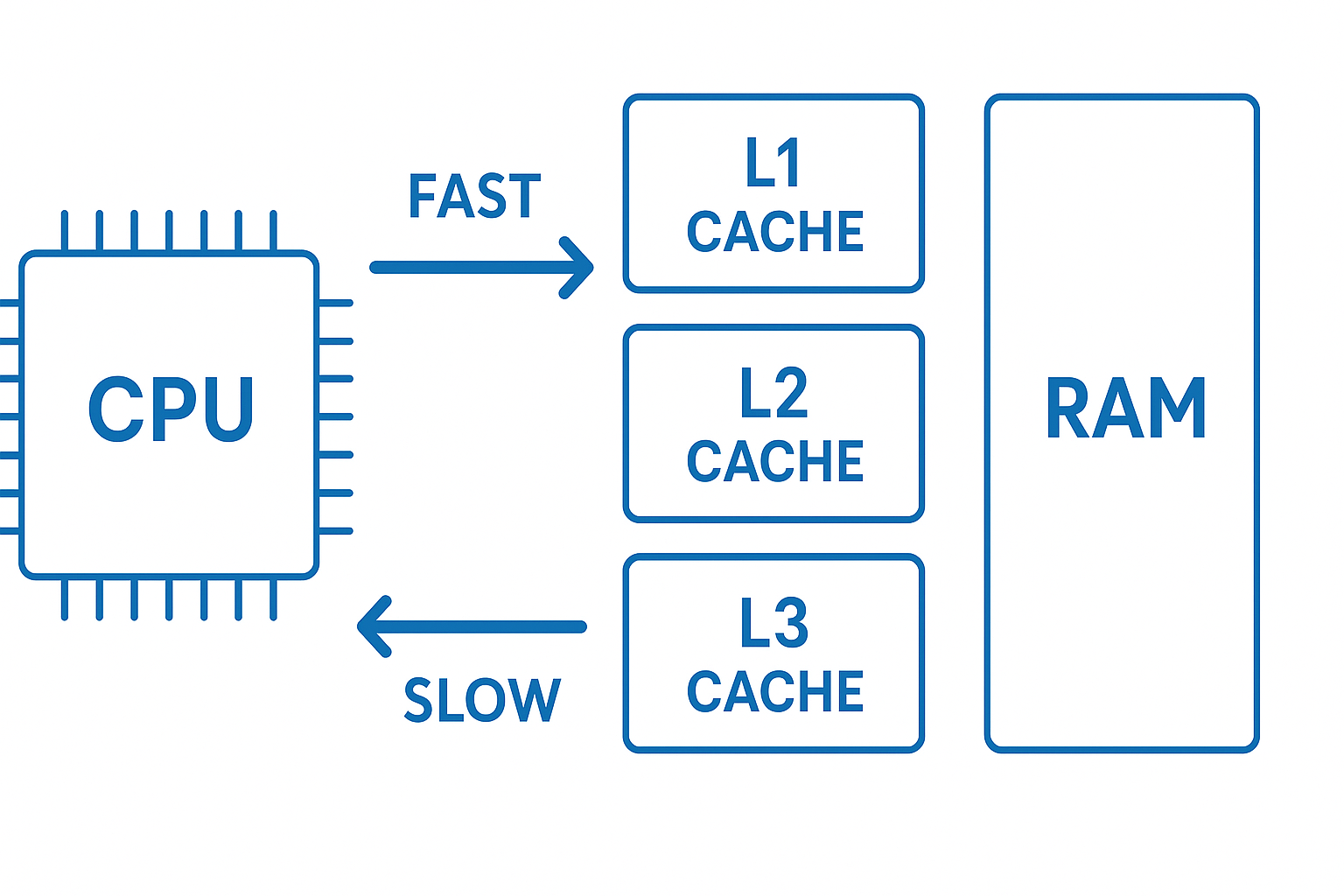
Cache Memory का Main काम होता है CPU को data ka shortcut देना, ताकि उसे बार-बार RAM तक न जाना पड़े और processing fast हो जाए। Cache Memory का working process समझना बहुत आसान है। चलिए step-by-step देखते हैं
Step-by-Step Working
Step 1: CPU किसी instruction को execute करने के लिए data की request करता है।
Step 2: CPU सबसे पहले Cache Memory में check करता है कि यह data पहले से मौजूद है या नहीं।
Step 3: Cache Hit या Cache Miss होता है
-
Cache Hit: Data cache में मिल जाता है → CPU को तुरंत मिल जाता है → processing ultra-fast होती है।
-
Cache Miss: Data cache में नहीं मिलता → CPU RAM से data fetch करता है।
Step 4: अगर RAM से data आता है, तो उसे Cache Memory में store कर लिया जाता है ताकि अगली बार वही data जल्दी मिल सके।
Step 5: Cache की वजह से CPU instructions को तेज़ी से execute कर पाता है और system smooth work करता है।
Cache Hit vs Cache Miss
-
Cache Hit: CPU → Cache → Fast performance
-
Cache Miss: CPU → RAM → Slow performance
इसी वजह से ज़्यादा cache होने पर system तेज़ लगता है।
CPU → Cache → RAM Data Flow (Simple समझिए)
CPU हमेशा यह order follow करता है अगली बार वही data direct cache से मिल जाता है।
1. पहले Cache Memory check करता है
2. Cache में data न मिले तो RAM से data लाता है
3. RAM से आया data Cache में store हो जाता है
4. Cache Memory के Types
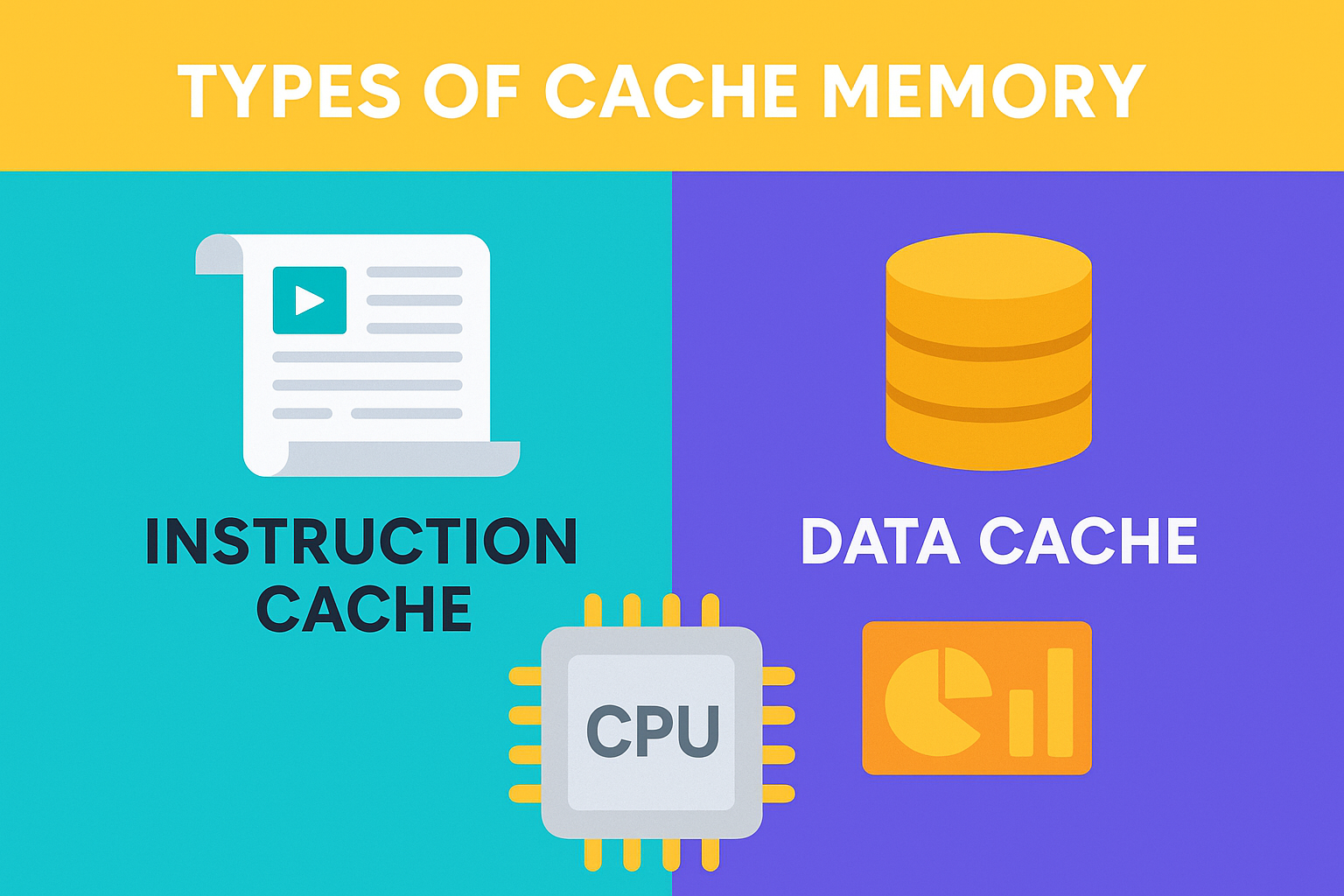
Cache Memory को उसके काम (function) के आधार पर तीन main types में divide किया जाता है। हर type का role अलग होता है, लेकिन goal एक ही होता है — CPU को fast data देना।
1. Instruction Cache
Instruction Cache में program से जुड़ी instructions store होती हैं। जब CPU किसी program को run करता है, तो उसे हर step की instruction चाहिए होती है। Instruction Cache इन्हीं instructions को पहले से save करके रखती है। इससे फायदा क्या होता है?
- CPU को अगली instruction जल्दी मिल जाती है
- Program execution fast हो जाता है
- Repeated instructions बार-बार RAM से नहीं लानी पड़ती
Simple example: बार-बार इस्तेमाल होने वाले commands पहले से ready रहते हैं।
2. Data Cache
Data Cache में वो data values store होती हैं जो program बार-बार use करता है। जैसे:
- Variables
- Numbers
- Calculation results
इससे फायदा क्या होता है?
- Arithmetic operations fast होते हैं
- RAM पर dependency कम हो जाती है
- Overall system performance improve होती है
Example: Calculator app में last calculations जल्दी open होना — data cache की वजह से।
3. Unified Cache
Unified Cache में instructions और data दोनों store होते हैं। यानी अलग-अलग cache की जगह एक common cache use होती है। इससे फायदा क्या होता है?
- Memory space का बेहतर use
- Cache management आसान
- Modern processors में ज्यादा common
Note: आजकल के CPUs ज़्यादातर Unified Cache architecture use करते हैं।
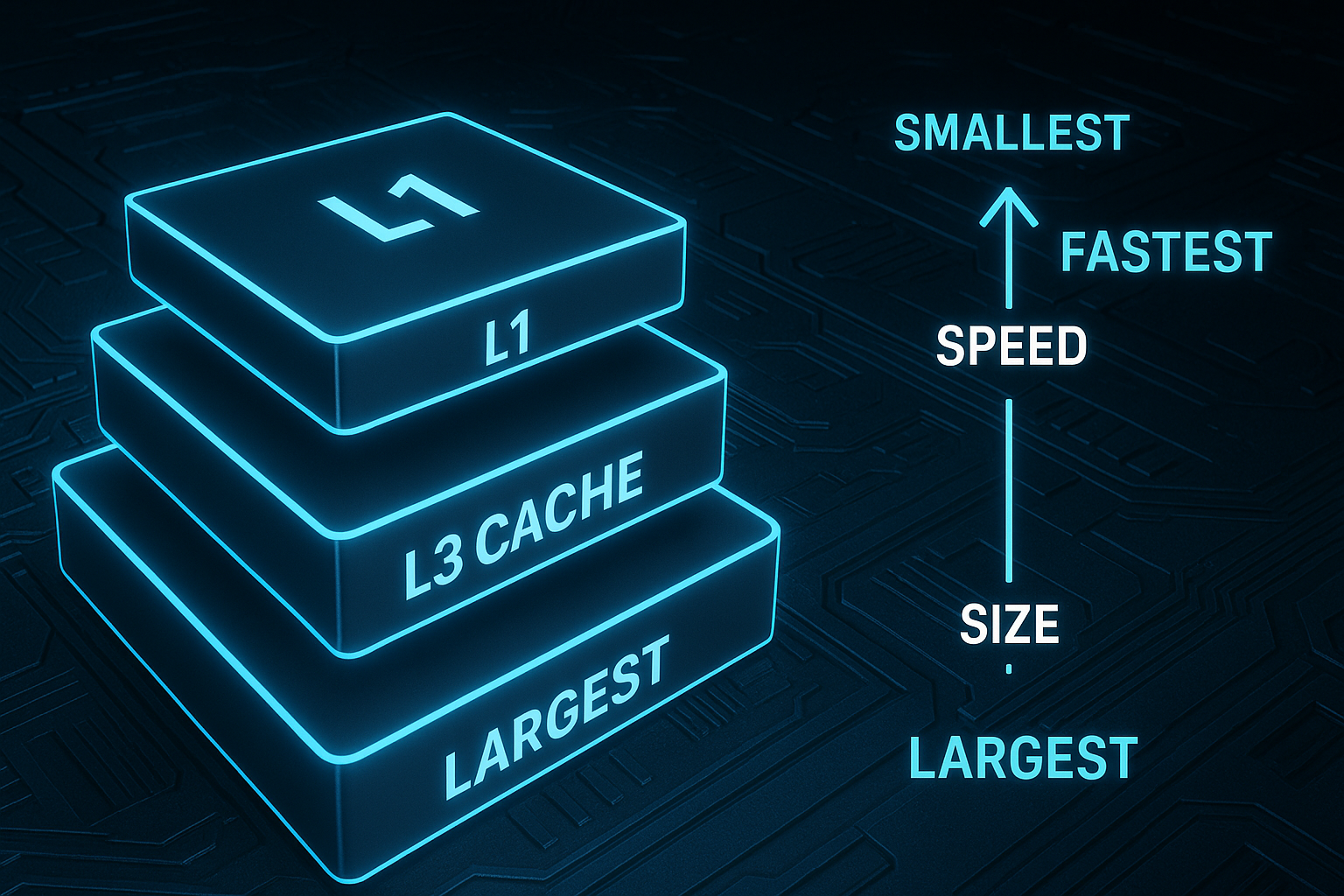
5. Cache Memory Levels (L1, L2, L3)
Modern CPU में Cache Memory तीन levels में divide होती है — L1, L2 aur L3।
Har level ka size, speed aur role alag-alag hota hai, ताकि CPU ko data fastest possible way mein mil sake।
L1 Cache (Level 1)
L1 cache sabse fastest cache memory hoti hai, isliye iska size sabse chhota hota hai।
• सबसे तेज़ cache
• Size: लगभग 16KB से 128KB
• CPU core के अंदर ही मौजूद
• Instructions aur Data ke liye alag-alag parts
(L1I = Instruction Cache, L1D = Data Cache)
Speed: Ultra-Fast
Purpose: CPU ke immediate operations ke liye instant data dena
L2 Cache (Level 2)
L2 cache, L1 se badi hoti hai aur thodi slow, lekin RAM se abhi bhi kaafi fast hoti hai।
• Size: लगभग 256KB से 2MB
• CPU core ke paas located
• L1 cache miss hone par data provide karti hai
Speed: Fast
Purpose: L1 miss ke baad CPU ko data supply karna
L3 Cache (Level 3)
L3 cache sabse badi cache hoti hai aur multi-core processors mein shared hoti hai।
• Size: लगभग 4MB से 64MB
• Sabhi CPU cores ke beech shared
• Multi-core coordination mein important role
Speed: Moderate (L1, L2 se slow, RAM se fast)
Purpose: Multiple cores ke beech data coordination aur performance balance
(Easy to Remember)
• L1 → Sabse fast, sabse chhoti
• L2 → Medium size, fast backup
• L3 → Sabse badi, shared memory
Rule:
L1 > L2 > L3 (Speed)
L3 > L2 > L1 (Size)
Comparison Table: L1 vs L2 vs L3 Cache
| Feature | L1 Cache | L2 Cache | L3 Cache |
|---|---|---|---|
| Speed | सबसे तेज़ | तेज़ | धीमी (Cache levels में) |
| Size | सबसे छोटी | Medium | सबसे बड़ी |
| Location | CPU core के अंदर | Core के पास | सभी Cores में Shared |
| Cost | Highest per KB | Medium | Lowest per KB |
| Access Time | 1–3 ns | 3–10 ns | 10–20 ns |
8. Cache Memory के फायदे (Advantages)
Cache Memory system performance को boost करने में बहुत important role play करती है। यही वजह है कि modern processors में cache को सबसे ज़्यादा priority दी जाती है।
- CPU speed को कई गुना बढ़ाता है Frequently used data cache में होने की वजह से CPU ko RAM ka wait nahi karna padta
- Processing तेज़ होती है Instructions जल्दी execute होते हैं, जिससे overall system fast feel करता है।
- Latency कम हो जाती है Data access time nanoseconds में हो जाता है, जो RAM से कहीं ज़्यादा तेज़ है।
- Multitasking smooth होती है Multiple apps aur processes ek saath better performance ke saath run kar paate hain।
- Power-efficient computing Fast access ke कारण CPU ko कम time active रहना पड़ता है, जिससे power save होती है।
High-performance applications में जरूरी Gaming, video editing, AI/ML aur heavy software cache ke बिना smooth nahi chal paate
9. Cache Memory के नुकसान (Disadvantages)
हालाँकि cache memory बहुत useful है, लेकिन इसकी कुछ limitations भी हैं।
❌ बहुत महंगी Memory होती है Cache SRAM technology पर based होती है, जो RAM से काफी expensive होती है।
❌ Size limited होता है Cache बहुत fast होती है, इसलिए इसे ज़्यादा बड़ा बनाना practical नहीं होता।
❌ Complex design Cache hierarchy (L1, L2, L3) design करना processor architecture को complex बनाता है।
❌ Cache miss होने पर delay अगर data cache में न मिले, तो CPU ko RAM se data lena padta hai, जिससे system slow feel कर सकता है।
❌ Processor cost बढ़ जाती है Zyada cache = zyada silicon area = higher CPU price
10. Cache Memory कहाँ-कहाँ उपयोग होती है?
Cache memory सिर्फ computer CPU तक सीमित नहीं है — यह कई जगह use होती है:
- Computers & Laptops – CPU cache (L1, L2, L3)
- Smartphones – Mobile processors ke fast performance ke liye
- Web Browsers – Browser cache fast page loading ke liye
- GPUs & Gaming Consoles – Graphics rendering aur gaming performance
- Servers & Data Centers – High-speed data processing
- AI / ML Systems – Large data models ko fast access dene ke liye
Browser Cache vs CPU Cache
| Feature | Browser Cache | CPU Cache |
|---|---|---|
| Purpose | Websites तेजी से load करना | CPU processing fast करना |
| Location | Storage (SSD/HDD) | CPU chip |
| Speed | Slow | Extremely fast |
| Stores | Images, CSS, JS | Instructions और data |
| Type | Software cache | Hardware cache |
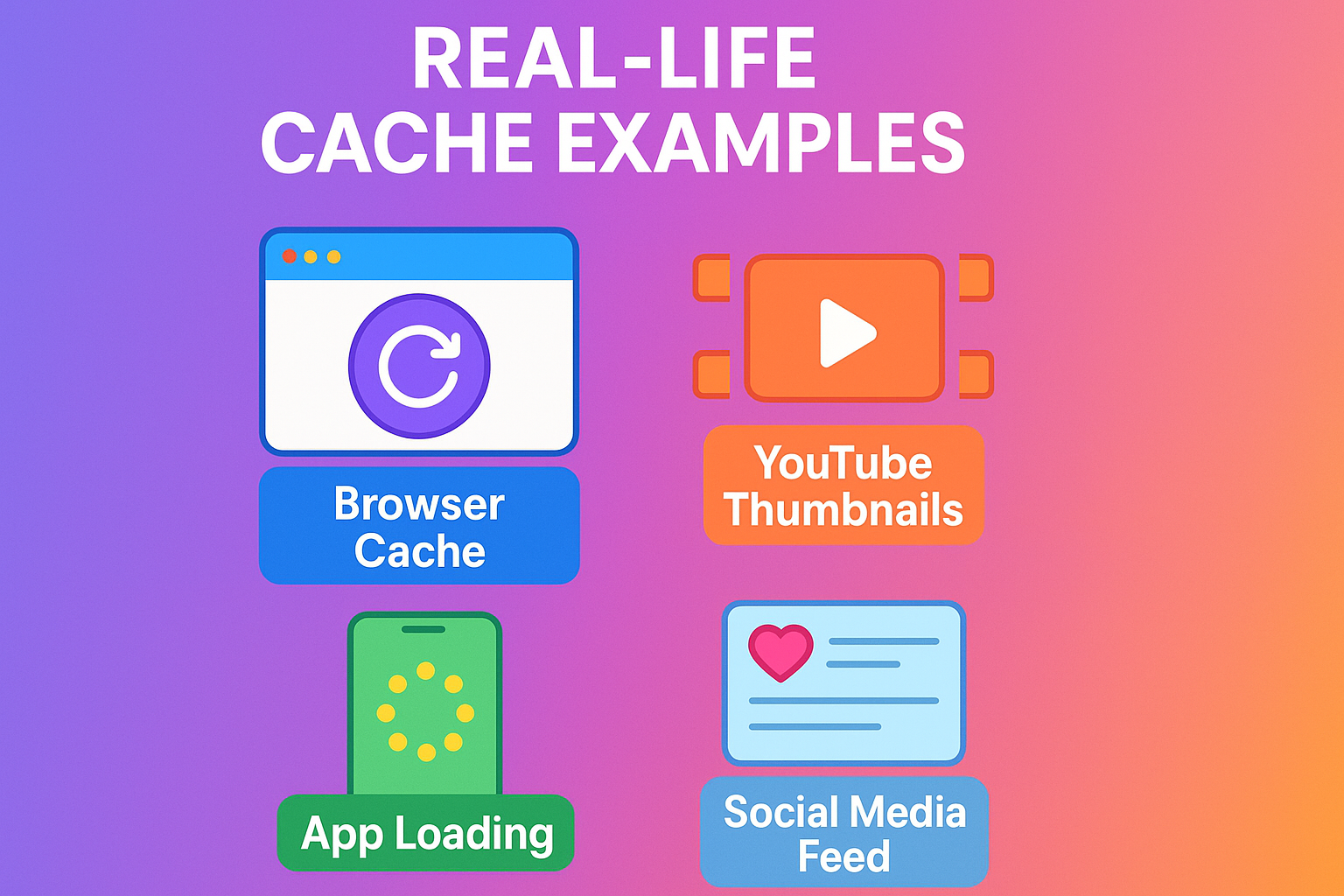
11. Real-Life Examples of Cache Memory
Cache Memory को समझने का सबसे आसान तरीका है daily life examples से। हम unknowingly हर दिन cache का benefit लेते हैं।
- YouTube thumbnails instantly load होना पहली बार वीडियो open करने के बाद अगली बार thumbnails जल्दी दिखने लगती हैं — यह cache की वजह से होता है।
- Facebook & Instagram feed fast open होना Images, profiles aur reels जल्दी load होती हैं क्योंकि app पहले से data cache में store कर लेता है।
- Mobile apps का fast reload होना App बंद करके दोबारा open करने पर data फिर से download नहीं होता — cache से instantly load हो जाता है।
- Games का quick buffering Game levels, textures aur graphics cache में store होने से loading time कम हो जाता है।
- Browser history & saved website data जल्दी load होना बार-बार visit की गई websites next time बहुत fast open होती हैं क्योंकि cache data पहले से मौजूद रहता है।
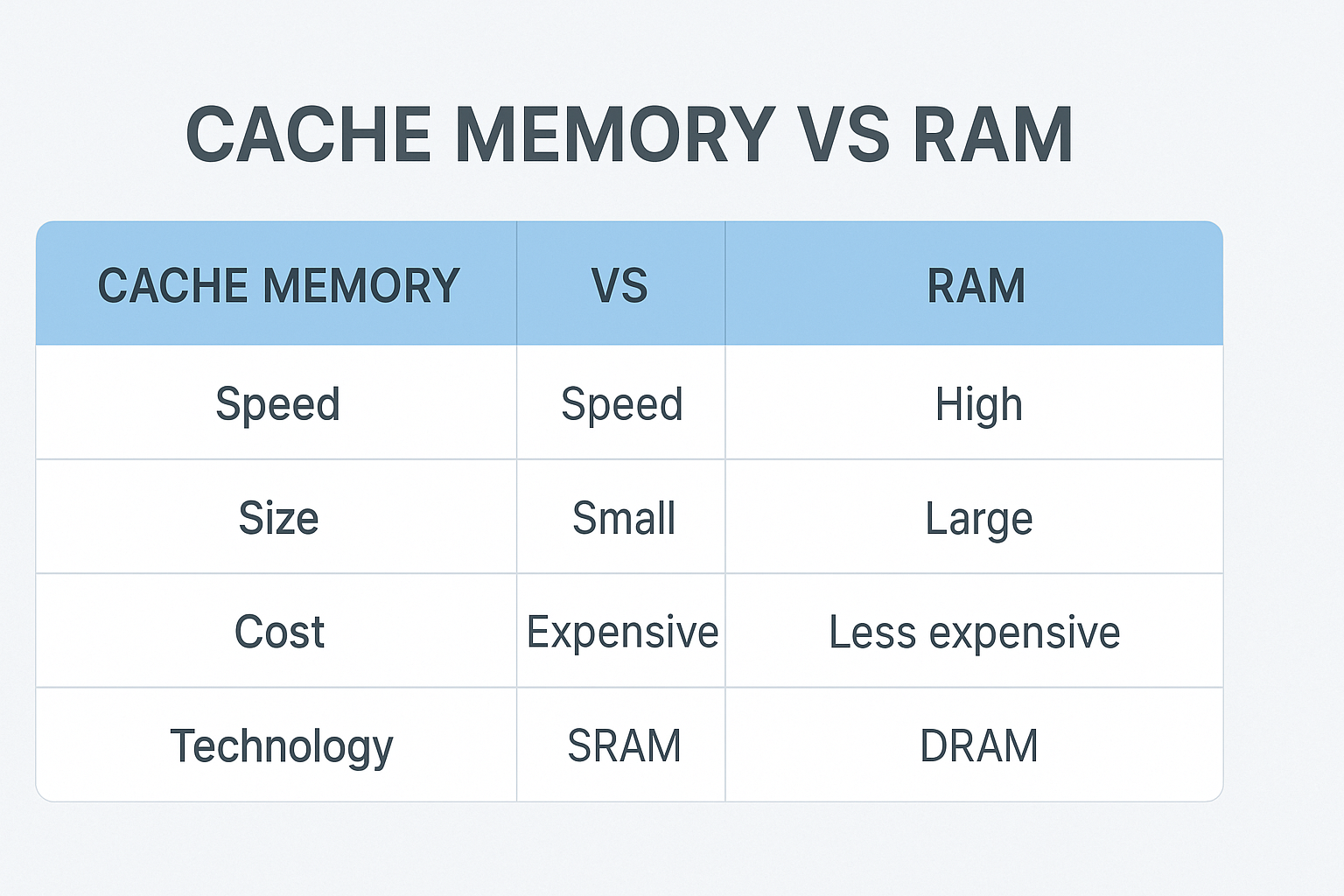
12. Cache Memory vs RAM
| Feature | Cache Memory | RAM |
|---|---|---|
| Speed | बहुत तेज़ | तेज़, लेकिन cache से धीमी |
| Cost | बहुत महंगी | सस्ती |
| Size | बहुत छोटी | बड़ी |
| Location | CPU के अंदर/पास | Motherboard पर |
| Use Case | CPU Processing Accelerate करना | Programs Run करने के लिए Temporary Storage |
| Technology | SRAM | DRAM |
14. Cache clear कर दूँ तो क्या मैं Password खो दूँगा?
नहीं। Cache clear करने से आपके passwords delete नहीं होते। यह एक बहुत common doubt है, लेकिन घबराने की कोई जरूरत नहीं है। Cache memory का काम सिर्फ temporary files store करना होता है, Passwords cache में store नहीं होते। जैसे:
• Website images
• Scripts
• Temporary data
• App/website loading files
Password कहाँ Store होते हैं? Passwords आमतौर पर इन जगहों पर store रहते हैं:
- Browser Saved Password Manager (Chrome, Firefox, Edge आदि)
- Cookies (login sessions के लिए)
- App ke secure storage / system vault
इसलिए जब आप Cache Clear करते हैं, तो:
✔ Saved passwords safe रहते हैं
✔ Accounts delete नहीं होते
✔ Personal data remove नहीं होता
Note: कभी-कभी cache clear करने के बाद website दुबारा login माँग सकती है, लेकिन आपका saved password auto-fill हो जाता है।
Cache vs Cookies vs Saved Password
| Feature | Cache | Cookies | Saved Password |
|---|---|---|---|
| क्या store करता है? | Images, files, scripts | Login session, preferences | Encrypted passwords |
| Clear करने पर effect | Website slow open होगी | Websites logout हो सकती हैं | Password नहीं मिटेंगे |
| Risk | No loss of passwords | Session loss possible | No effect |
15. Cache Memory Delete करना कब अच्छा होता है?
Cache Memory delete करना safe aur useful hota hai, खासकर तब जब आपका device या app normal तरीके से काम नहीं कर रहा हो। Cache delete करने का main purpose temporary problems को fix करना और performance improve करना होता है।
Cache Delete करना अच्छा होता है जब:
- Mobile या Computer slow या hang करने लगे
- Internet connected हो लेकिन pages load न हों
- कोई App बार-बार crash या freeze हो रही हो
- Storage बिना वजह fast भरने लगे
- App update के बाद नई problem आने लगे
- Website सही से open न हो या old data दिखाए
ऐसे cases में cache clear करने से Device fresh feel करने लगता है और apps smoother काम करने लगते हैं। Cache Delete करने से क्या नुकसान होता है? Cache delete करने से कोई permanent नुकसान नहीं होता — यह एक safe process है। लेकिन कुछ temporary changes हो सकते हैं:
• App पहली बार open करते समय थोड़ा slow लग सकता है Websites दोबारा load होंगी
• कभी-कभी app या website से logout हो सकता है
Important बात: कुछ भी delete नहीं होता — सिर्फ temporary files हटती हैं।
❌ Personal data
❌ Photos / Videos
❌ Contacts
❌ Messages
FAQs
Q1: Cache Memory क्या होती है?
Cache Memory CPU और RAM के बीच मौजूद एक बहुत तेज़ Temporary Memory होती है, जिसमें frequently used data और instructions store रहते हैं, ताकि CPU को बार-बार RAM से data न लेना पड़े।
Q2: Cache Memory के कितने Types होते हैं?
Cache Memory के तीन main types होते हैं:
- Instruction Cache – Program instructions store करता है
- Data Cache – Frequently used data values store करता है
- Unified Cache – Instructions और data दोनों store करता है
Q3: L1, L2 और L3 Cache में क्या अंतर है?
- Speed: L1 सबसे तेज़ होती है, फिर L2 और L3
- Size: L3 सबसे बड़ी होती है
- Location:
- L1 → CPU core के अंदर
- L2 → CPU के बहुत पास
- L3 → Multiple cores के बीच shared
Q4: Cache Memory, RAM से faster क्यों होती है?
Cache Memory SRAM technology पर based होती है और CPU के बहुत पास होती है, इसलिए इसे access करने में nanoseconds लगते हैं, जबकि RAM को ज्यादा time लगता है।
Q5: Cache Miss क्या होता है?
जब CPU जिस data को access करना चाहता है वह Cache Memory में available नहीं होता, तब CPU को RAM से data fetch करना पड़ता है — इसे ही Cache Miss कहा जाता है।
Conclusion
Cache Memory क्या होती है — यह Modern Computer Architecture का एक core हिस्सा है, जो system की speed और performance को direct impact करती है। CPU चाहे कितना भी powerful क्यों न हो, अगर Cache Memory efficient न हो, तो system slow महसूस हो सकता है।
Cache Memory का main role यही है कि frequently used data को CPU के बिल्कुल पास रखे, ताकि processing में delay न आए। यही वजह है कि आज के processors में L1, L2 और L3 Cache performance के लिए बहुत important मानी जाती हैं।
- L1 Cache ultra-fast response देता है
- L2 और L3 Cache multitasking और heavy apps को smooth बनाते हैं
- 2026 में Processor performance का सबसे बड़ा deciding factor सिर्फ clock speed नहीं, बल्कि Cache Architecture बन चुका है
अगर आप gaming, multitasking या high-performance devices use करते हैं, तो Cache Memory को समझना आपके लिए बेहद ज़रूरी है।
अगर यह article आपको helpful लगा हो, तो इसे bookmark करें और अपने दोस्तों के साथ share ज़रूर करें, ताकि उन्हें भी Cache Memory के बारे में सही जानकारी मिल सके। अगर आपके मन में कोई सवाल है तो नीचे comment करके पूछिए, हम simple language में reply ज़रूर करेंगे — जैसे
- Cache clear करना safe है या नहीं?
- Mobile cache और CPU cache में क्या फर्क है?